

Search Token/Wallet
How to Quickly Get Started with USDT TRC20 Wallet: Beginner’s Guide
Beginner
Quick ReadsWhat Are USDT TRC20 and Wallets?
--------------------------------
USDT (Tether) is a stablecoin pegged to the US dollar, widely used for settlements and hedging in the crypto market. "TRC20" indicates that it operates on the Tron blockchain using its specific token standard. In simple terms, a USDT TRC20 Wallet is a digital wallet compatible with the Tron network that enables you to store, send, and receive USDT.
Compared to the traditional ERC20 version, USDT TRC20 offers exceptionally low transaction fees and rapid transfer speeds, making it suitable for frequent transactions.
Why Choose a TRC20 Network Wallet?
----------------------------------
Choosing a TRC20 network wallet provides several key advantages:
- Low transaction fees: Sending USDT on the Tron network typically costs only a few cents.
- Fast transaction speed: TRC20 transfers are usually confirmed within seconds, making them suitable for frequent transactions.
- Broad compatibility. Leading exchanges, such as Gate, Binance, and OKX, fully support TRC20.
- Mature ecosystem: Tron boasts an active ecosystem for DApps, DeFi, and cross-chain applications, as well as extensive wallet support.
For personal payments, asset management, or merchant settlements, TRC20 wallets are an excellent choice for newcomers.
USDT TRC20 Wallet Types and Features Recommended for Beginners
--------------------------------------------------------------
When selecting a wallet, beginners should prioritize three key aspects:
- TRC20 network support: Popular multi-chain wallets like Gate Wallet, Trust Wallet, and TokenPocket all support TRC20. Tron-focused wallets such as TronLink offer more reliable DApp connectivity.
- Simplified interface and intuitive operation: Wallets suited for beginners should feature interfaces similar to mobile payment apps, making them easy to navigate.
- Robust security features: Look for mnemonic backup, local storage of private keys, and biometric authentication, including fingerprint and facial recognition.
How to Create and Use a USDT TRC20 Wallet (Step-by-Step)
--------------------------------------------------------
Gate Wallet is used as an example below:
Step 1: Download the wallet application from the official website or app store. Do not use unfamiliar links.
Step 2: Create a wallet. Open the app → select “Create New Wallet” → write down the mnemonic phrase (12 or 24 words), and store it offline.
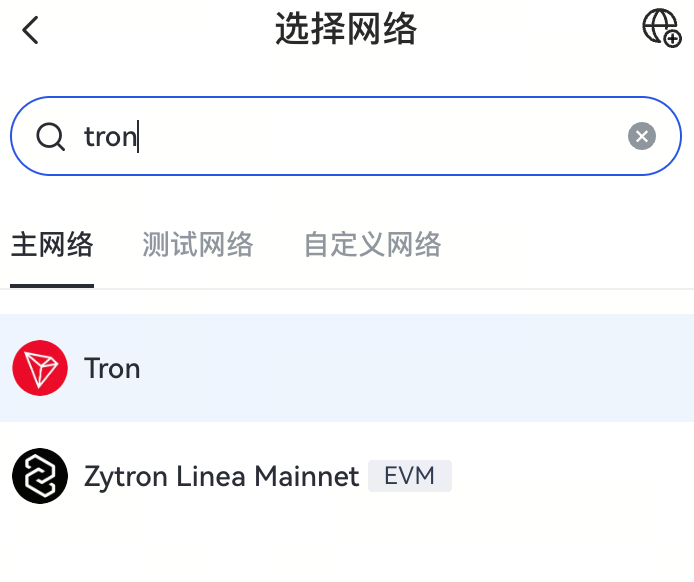
Step 3: Select the Tron network. After setup, search for and select the “Tron (TRX)” network from the main interface.
Step 4: Obtain your address and deposit funds. Tap “Receive,” select USDT, and your deposit address will be displayed.
Step 5: Transferring. When sending USDT, make sure your wallet contains a small amount of TRX to cover transaction fees. Enter the recipient’s address → amount → confirm the transaction.
The entire setup process can be completed in a few minutes, making it suitable for beginners.
Risks and Precautions When Using a USDT TRC20 Wallet
----------------------------------------------------
While TRC20 wallets are user-friendly, it’s crucial to pay attention to security:
- Never share your mnemonic phrase; it’s the sole “key” to your wallet.
- Verify the correct network: Always select the TRC20 network for transfers, or your funds could be lost.
- Beware of fake wallets and phishing sites. Only download from official sources.
- Maintain a small TRX reserve: This ensures you can complete transactions at any time.
- Monitor updates to fee policies. Some companies (such as BitHide) are rolling out cost-saving initiatives. These may soon become available to individual users.
Following these guidelines will help keep your USDT TRC20 wallet secure and efficient.
Author: Max
* The information is not intended to be and does not constitute financial advice or any other recommendation of any sort offered or endorsed by Gate Web3.
* This article may not be reproduced, transmitted or copied without referencing Gate Web3. Contravention is an infringement of Copyright Act and may be subject to legal action.
Related Articles

Beginner
2026 Stablecoin Classification Deep Dive: From Fiat-Collateralized to Algorithmic Stablecoins, Market Landscape and Future Trends
A thorough breakdown of stablecoin types—including fiat-backed, crypto-collateralized, algorithmic, and hybrid models—paired with up-to-date regulatory and market trends, empowers readers to navigate the stablecoin ecosystem and make informed investment decisions.

Beginner
What Are Fractional NFTs? Understanding the Mechanics of NFT Fractionalization and Its Real-World Use Cases
Fractional NFTs make high-value NFTs more accessible by breaking them into tradable shares. This article offers a comprehensive overview of the underlying technology, practical use cases, and inherent limitations.

Beginner
Top Telegram Games to Watch in 2026: The New Web3 Gaming Frontier and Investment Strategies
A comprehensive review of the top Telegram games to watch in 2026—including standout projects like Notcoin, Hamster Kombat, and Azuki Alley Escape—offering expert insights into gameplay trends and potential investment opportunities.

Beginner
The Next 100x Coin? Low-Cap Crypto Gem Analysis
This article analyzes cryptocurrency projects with low market capitalization that may be noteworthy in 2025, offering analysis from the perspectives of technology, community engagement, and market potential. Additionally, the report offers guidance on coin selection and highlights key risk factors for new investors.

Beginner
What Is Jupiter? A Complete Guide to Solana’s Leading Decentralized Exchange Aggregator
Jupiter stands as the core decentralized exchange aggregator within the Solana ecosystem, delivering users the best prices, minimal slippage, and seamless cross-pool liquidity integration. This article thoroughly examines Jupiter's mechanisms, exploring its features, strengths, trading processes, and future outlook. You'll gain a clear understanding of why Jupiter has emerged as the primary entry point for trading on Solana.

Beginner
Best Metaverse Projects in 2026: Seizing the Next Digital Wave
A comprehensive analysis of the leading Metaverse projects for 2026: Explore key developments from Web2 giants like Meta and Roblox, as well as Web3 frontrunners including The Sandbox and Decentraland. This article delivers the latest trends, technological breakthroughs, and investment opportunities in the Metaverse sector.